 SQL Sage · AI pair-DBA for SSMS
Runs inside SQL Server Management Studio 22
Your AI pair-DBA for SSMS 22 — it proves what a change will break before you run it, and keeps an audit log of the queries it runs.
SQL Sage is an extension (add-in) you install inside SQL Server Management Studio 22 on Windows. Its interface is in English. It runs as part of SSMS — not a website, not an online SQL editor — and works through Claude Code or the Codex CLI on your machine, where you sign in with your own Claude or ChatGPT account (or you use your own Anthropic API key).
Before any ALTER or DROP it reads your database and proves the blast radius — the dependent views, procedures and triggers, the inbound foreign keys, the rows at risk — deterministically, not guessed. The queries it runs are written to a local, tamper-evident audit log you can export as evidence, and no write runs without passing a ScriptDom safety gate first.
AI usage not included: SQL Sage needs your own AI access (Claude Code on a paid Claude plan, the Codex CLI with a ChatGPT account, or your own Anthropic API key). See pricing
SSMS 22 · Windows · runs through Claude Code or Codex CLI · own it from $39 or subscribe from $29/yr
| What it is | A downloadable extension (VSIX add-in) you install inside SSMS — not a web app, not a standalone tool |
|---|---|
| Host | SQL Server Management Studio 22 (Windows 10 / 11) |
| Interface language | English |
| Sign-in | In Claude Code or the Codex CLI, with your own Claude or ChatGPT account; or your own Anthropic API key |
| AI providers | Anthropic Claude and OpenAI Codex / ChatGPT |
| Vendor | LumaSoft — independent; not affiliated with Microsoft, Anthropic, OpenAI or DBeaver |
Why it exists
Three things that break a DBA's flow — solved without leaving SSMS.
01
The red error you have to go read about
Msg 8134, divide by zero — again. SQL Sage sees the error in the Messages pane and your query, explains the real cause, and proposes a safe fix you can insert with one click.
02
"Why is this query slow?" — answered from the plan
Point it at the execution plan or a Query Store regression. It reasons over the actual plan and statistics, not a guess from the query text alone.
03
AI that wants to run SQL on production
Every statement is classified before it runs. Read-only executes; anything that writes or changes schema stops for your explicit approval, with the full SQL in front of you. A gate, not a hope — and the queries it runs are written to a tamper-evident audit log.
What's inside
Everything a chat assistant should do in SSMS — and the DBA parts it usually skips.
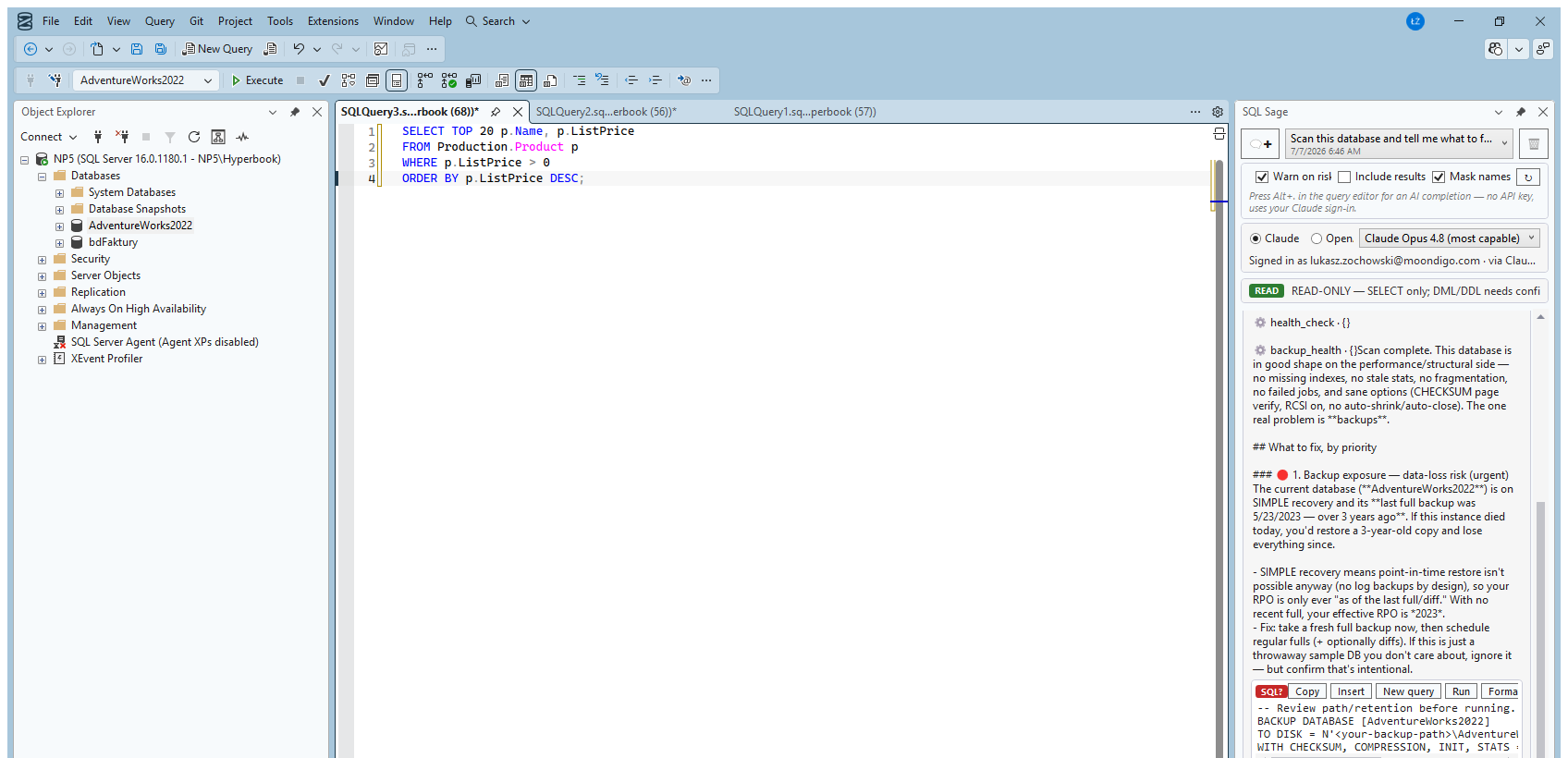
Real captures from the live panel where a picture helps — everything else described in plain terms. All of it ships today.
01 Chat in the context of your connection
The chat is locked to one server and database, shown at the top at all times. Answers know which engine, version, and database they're talking about.
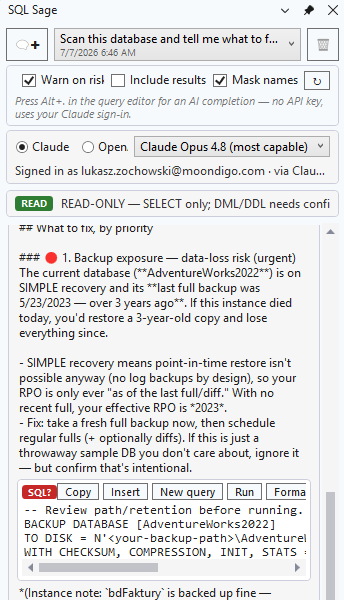
02 SQL block toolbar: Copy · Insert · New query · Run · Format
Every SQL block the assistant writes carries a READ / WRITE / DDL badge and one-click actions. Insert is never Run — putting text in your editor and executing it are two different buttons.
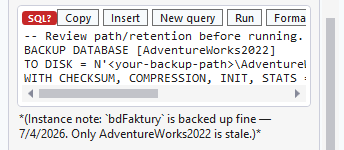
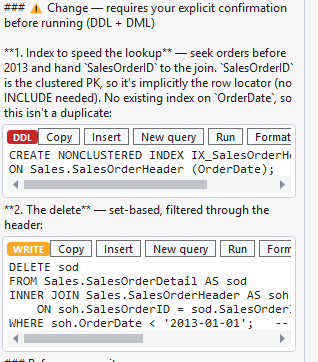
03 ScriptDom safety gate
Statements are classified by the same parser SSMS uses. SELECT runs read-only; DML and DDL require a confirmation dialog showing the exact SQL before anything executes.
04 Query Store, built in
Ask for regressed queries, top consumers, or a stored plan. SQL Sage reads Query Store directly — something GitHub Copilot in SSMS doesn't do (as of July 2026).
- Regressed queries — recent window vs an earlier baseline
- Top consumers by
duration,cpuorreads, over a chosen time window - The stored execution plan for any
query_id, incl. whether it's forced - Falls back to the plan cache when Query Store is off
05 Slash commands
/explain, /optimize, /fix, /doc on your attached query, plus /format with zero tokens. The commands DBAs expect, on the code you're looking at.
/explain·/optimize·/fix·/doc— act on the query you have open/querystore— top regressed and most expensive queries for this database/format— deterministic local formatting, zero tokens/help— the full list, in the panel
06 Right-click any SQL: Explain · Fix · Optimize · Document
Select T-SQL in a query window and pick an action from the editor's right-click menu — or press Ctrl+Alt+Shift+E/F/O/D. The chat opens with your SQL already in context; no copy-paste.
- Explain — a plain-language, step-by-step walkthrough
- Fix — find the bug and return the corrected query
- Optimize — indexing and rewrite suggestions, with reasoning
- Document — add clear comments and a purpose summary
- Also in the Tools menu; shortcuts shown next to each action
07 Deep performance diagnostics
The tuning parts Copilot in SSMS calls “out of scope” (as of July 2026). SQL Sage runs the server-side DMVs itself and lets the model interpret real numbers — not guesses.
- One-click health check — backups, failed jobs, fragmentation, stale stats, memory pressure, risky options, in one scan
- Backup coverage & RPO risk — last full/diff/log per database, flagged
- Wait stats — engine-aware (box SQL Server vs Azure SQL), idle waits filtered
- Live blocking & deadlock history (
system_health: victim + lock graph) - Missing & unused indexes — cross-checked against the indexes you already have
- Execution plan — estimated and actual (real vs estimated rows)
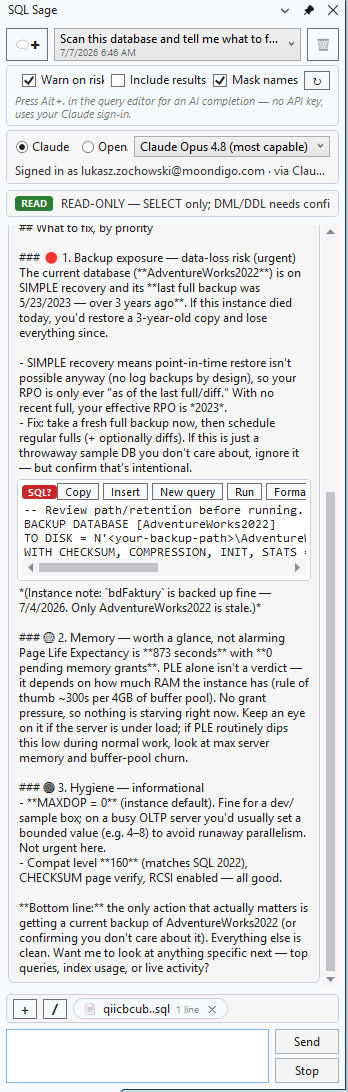
08 Change-Impact: prove the blast radius before you ALTER or DROP
Before it will recommend or run any ALTER or DROP, SQL Sage reads your database and shows exactly what breaks — deterministically, straight from the sys catalogs, not guessed.
- Referencing objects — views, procedures, functions, triggers, computed & CHECK/DEFAULT constraints
- Inbound foreign keys — the child tables that point at it
- Rows at risk — the row volume you'd lose on a
DROP - The object's own indexes
- Honest limit: static catalog analysis can't see dynamic (
EXEC/sp_executesql) or cross-database SQL — an empty list means "nothing static found", not "nothing breaks" - Engine-aware: box SQL Server, Azure SQL Database, Managed Instance
09 Permissions & role audit
Who can access what — a question Copilot in SSMS declines to answer (as of July 2026). Read-only, database-scoped, with nested role membership expanded.
- Overview — every user and role, flagged for high privilege
- Per principal — effective (nested) roles plus explicit grants
- Per object — grantees, including column-level permissions
- Works on box SQL Server and Azure SQL Database
10 Claude and ChatGPT in SSMS — on your own account
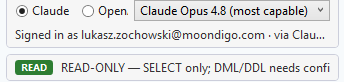
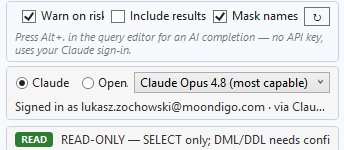
Use your own Claude (through Claude Code) or ChatGPT and Codex (through the Codex CLI) right inside SSMS — switch provider and model, keep your history. It runs on your own AI access: no API key is needed with Claude Code or Codex, and nothing is resold or metered by us. The model list updates itself — new Claude and ChatGPT models appear in the picker without waiting for a plugin release.
11 Pin to a window
Working across five servers? Pin the chat to a specific query window so context never drifts to the wrong connection.

12 Privacy by default
Schema metadata and your query go to the model; query results never do, unless you opt in per session. Server and database names can be masked.
13 Portable skills
Reusable DBA playbooks as Anthropic SKILL.md files — versioned, shareable, and interoperable with Claude Code and GitHub Copilot in SSMS. Write a tuning or audit routine once; run it anywhere.
- Ships with deadlock-triage, blocking-triage, index-tuning, query-regression, db-health-review
- Reads your personal
~/.claude/skills— the same folder Copilot & Claude Code use - Open standard
SKILL.md— no lock-in; author once, reuse across machines & teams
14 The queries it runs, logged — tamper-evident
The queries SQL Sage runs or blocks on your database are recorded to a local, hash-chained audit log — on by default, switched off with the “Audit SQL” option — so an edit, deletion or reorder of any entry still in the file is detectable. Export an evidence pack of what ran against production and who approved it.
- Records executes, confirmations and cancellations — with server/database, login, classification, SQL and row count
- Not logged: schema look-ups (table lists, column definitions), a few read-only diagnostics (wait stats, plan-cache top queries, active requests, deadlock history) and repository reads
- Tamper-evident — a SHA-256 hash chain flags any altered or removed entry
- Evidence pack in Markdown + JSON, with a one-line integrity verdict
- Connection names can be masked in the export
- Honest scope: a bare append-only chain cannot prove the newest lines weren't dropped from the end — a tamper-evidence aid, not a certified or immutable compliance record
15 Incident Mode: one-click on-call triage that cites the proof
When production is on fire, one click tells you what's wrong — and cites the proof. The 🚑 Incident button runs a deterministic, read-only snapshot of what the server is doing right now, and every conclusion is grounded in a real number, not guessed.
- Blocking chain — who blocks whom, and for how long
- Top waits — each with its % share; on box SQL Server, also tempdb & log pressure
- Most expensive in-flight queries — elapsed / CPU, with the running SQL
- Deterministic — reads the server's DMVs directly; no provisioned cloud AI needed
- Edition-aware: box SQL Server and Azure SQL Database (right database-scoped DMVs +
VIEW DATABASE STATEon Azure) - Honest scope: a point-in-time snapshot of server state (DMV counters are cumulative) — reads server state only, never table data
16 Prove-It: prove an AI rewrite returns the same rows
Don't take the AI's word that a rewrite is equivalent — prove it. When SQL Sage (or you) optimizes or rewrites a query, one click runs both versions and checks whether the rewrite returns the same rows as the original — with the numbers behind it, not a claim.
- One click after any rewrite — a deterministic, server-side multiset fingerprint compares the two result sets order-independently and duplicate-aware, catching lost or duplicated rows that a naive
DISTINCT/EXCEPTcheck misses - Clear verdict — EQUIVALENT, DIFFERENT (with the differing rows, if you've enabled results), or an honest UNDECIDABLE when it genuinely can't be proven (a nondeterministic function like
GETDATE()/NEWID(), orTOPwithoutORDER BY) — it says so instead of guessing - Logical-reads delta — so you see how much cheaper the rewrite actually is, side by side
- Runs read-only in a rolled-back transaction, costs zero AI tokens (deterministic C#/SQL — works on the free CLI), on box SQL Server and Azure SQL Database, and every proof is written to the tamper-evident audit log
- Honest scope: verified on your current data right now — not a proof for all possible data — and it compares the row multiset (order-independent), so it doesn't prove ordering
17 Connect a repository — code-aware chat preview
Connect your application's source repository so the assistant reasons about your app code alongside the database — schema, queries and the code that uses them, in one context. Opt-in, per repository. Repository access runs on the Claude channel only (for now) — a deliberate security choice, explained below.
- Opt-in per repository — you consciously turn on access, one repo at a time
- Native file, shell and search tools are disabled while a repo is connected. The assistant reads your repository only through SQL Sage's own
read_repo_fileandsearch_repotools. They read the live repository folder — nothing is copied — and stay confined to it: paths outside the folder and symbolic links are refused. Disconnecting ends the access. - Secret files (
.env,appsettings*.json,*.pem,*.key,.aws/,.ssh/,.git/and similar) are refused, and search skips them. In other files, recognisable secret tokens — private keys, cloud access keys, provider tokens, JWTs — come back as‹secret redacted›. A password written as plain text in an ordinary source file is not recognised, so keep secrets out of source code. - Claude channel only — on purpose. This fence works because on the Claude channel we can turn off the native file tools and serve the repository only through our own tools. The OpenAI Codex sandbox restricts what the process is allowed to do, not which files are read, so we don't enable repo access there rather than risk exposing your other credentials. We enable it only where we can fence off secrets this way — Codex will follow once we can do that just as safely.
- SQL execution is unchanged — SELECT auto-runs; writes and DDL still stop for confirmation
- Honest scope: code-aware chat (preview) — it reasons about your code next to the database, but does not yet prove which line of code produced a given query
18 See what's sent — and what it costs
An egress panel shows the exact payload leaving for the model — schema and your query (plus connected-repo code when a repo is attached), never your data unless you opt in. A live token counter and a heads-up before large operations keep the cost in view.
- Egress indicator & “what's sent to the API” panel — inspect the precise schema + query payload before it leaves; query results never go unless you opt in per session
- Live token-usage counter — watch consumption as you chat, with a warning before large operations
- Guided first run — an onboarding empty-state with example prompts gets you productive in seconds
Honest comparison
GitHub Copilot in SSMS is free. Here's when you'd want SQL Sage instead.
Copilot suggests changes; SQL Sage proves their blast radius first — and logs the queries it runs. If Copilot works for you and your org allows it, use it — the table shows where it wins, too. SQL Sage is for the cases it doesn't cover: deterministic, provable, accountable DBA work on the AI access you already have.
| GitHub Copilot in SSMS | Redgate SQL Prompt | SQL Sage | |
|---|---|---|---|
| Sign in with your own Claude / ChatGPT account | No — GitHub account required | n/a | Yes — Claude Code or Codex |
| Works where GitHub is blocked by policy | No | Yes | Yes |
| Parser-level statement classification (not just approval) | Read-only default; you approve writes | n/a | Same, plus a ScriptDom parser gate |
| Purpose-built deterministic DBA tools (Query Store, backups, indexes, waits) | Agent can run SQL; no dedicated tools | No | Yes — values read from the server |
| Reads your application source code alongside the database (opt-in) | No — database only | n/a | Preview — Claude channel only; opt-in, per repository |
| Deterministic blast-radius proof before ALTER / DROP | Agent can run SQL; no dedicated proof | No | Yes — dependents, inbound FKs, rows & indexes |
| Tamper-evident audit log + evidence export | No | No | Yes — hash-chained · Markdown + JSON |
| One-click incident triage that cites live server metrics | Agent can run SQL; needs provisioned Azure OpenAI | No | Yes — cited from live DMVs |
| Proves an AI rewrite returns the same rows | Suggests rewrites; no equivalence proof | Suggestions only; no proof | Yes — deterministic multiset, zero AI tokens |
| Deterministic SQL formatting | No | Yes | Yes (ScriptDom) |
| Inline completions (ghost text) | Yes | Yes | Yes — on request (Alt+.) through Claude Code or Codex; as you type with your own Anthropic key |
| AI usage billed by the tool vendor | Copilot plan · usage-based billing | n/a | No — you bring your own AI access |
| Free tier to start | Yes — limited free | No | 30-day free trial, then paid |
| Native in SSMS, Microsoft-signed | Yes | Third-party (signed) | Third-party (signed by LUMA sp. z o.o.) |
| Price | Free tier + usage-based paid | $210/user/yr | $39 once or $29/yr · 30-day free trial |
Competitor columns reflect each vendor's public information as of July–August 2026. Redgate price: public price list, read 2026-10-05.
Built for production
Trust is the feature.
A tool that can run SQL on your production server has to earn its place. Here's how.
Read-only by default
Every statement is classified before it runs. Writes and DDL never auto-execute — you approve the exact SQL, and you can edit it first.
One connection, always visible
The chat locks to one server and database, shown at the top. You always know which server an answer will touch.
Your data stays yours
Schema metadata is not your data. Query results are never sent to the model without your explicit, per-session opt-in. Server and database names can be masked.
We never hold your tokens
You sign in inside Claude Code or Codex, on your own machine. On that path SQL Sage only asks the CLI whether you're signed in — it never sees, stores, or transmits your credentials. An optional own API key is the exception, and stays DPAPI-encrypted on your machine.
Pricing
Own it once, or subscribe. Your call.
Buy a perpetual licence and keep it forever, or subscribe for the always-latest build. Either way you bring your own Claude or ChatGPT account — nothing metered or resold by us. Start with a 30-day free trial, all features, no credit card.
AI usage not included: you need your own AI access (Claude Code on a paid Claude plan, the Codex CLI with a ChatGPT account, or your own Anthropic API key) — details below.
After the 30-day trial, SQL Sage keeps working as SQL Sage Free — the editor tools below, with zero AI (LLM) calls. AI features and the Proven & Accountable layer need a licence.
- Free: F5 execution warnings, JOIN…ON suggestions from foreign keys, Format SQL, Expand SELECT *, Qualify object names, Execute current statement, and a one-click database health check (read-only, no AI).
- With a licence: AI chat, Explain / Fix / Optimize / Document, AI completions (Alt+.), and the Proven & Accountable layer — Change-Impact, Incident Mode, Prove-It.
Own it — one-time
Personal
PLN 149 · GBP 29 · EUR 35*
1 seatIndividual DBAs & consultants
Licence never expires. Includes updates released within 12 months of purchase.
Buy PersonalPro popular
PLN 299 · GBP 59 · EUR 69*
up to 5 seatsSmall teams & power users
Licence never expires. Includes updates released within 12 months of purchase.
Buy ProTeam
PLN 679 · GBP 135 · EUR 159*
up to 10 seatsTeams, priority support
Licence never expires. Includes updates released within 12 months of purchase.
Buy TeamSubscription — always latest
Personal
PLN 109 · GBP 22 · EUR 25*
1 seatIndividual DBAs & consultants
Always the latest version, updates included, cancel anytime.
Subscribe — PersonalPro popular
PLN 229 · GBP 45 · EUR 52*
up to 5 seatsSmall teams & power users
Always the latest version, updates included, cancel anytime.
Subscribe — ProTeam
PLN 489 · GBP 99 · EUR 115*
up to 10 seatsTeams, priority support
Always the latest version, updates included, cancel anytime.
Subscribe — Team// 30-day free trial, no card. Checkout is hosted by Paddle, our merchant of record. Prices are in USD; in Poland (PLN), the United Kingdom (GBP) and, marked *, these euro countries: AT BE HR CY EE FI FR DE GR IE IT LV LT LU MT NL PT SK SI ES, Paddle charges the local price shown under each plan. Depending on your location, Paddle shows the price with tax included or adds tax on top; the checkout shows the total before you pay.
AI usage is not included in the price. SQL Sage runs on AI access you bring: Claude Code signed in with a Claude plan that includes it (Pro, Max, Team or Enterprise — the free Claude plan does not) or with an Anthropic Console account; or the Codex CLI signed in with your ChatGPT account (OpenAI includes Codex in ChatGPT Free, Go, Plus, Pro, Business, Edu and Enterprise, with usage limits that depend on the plan); or your own Anthropic API key, billed by Anthropic. Plan details as stated by Anthropic and OpenAI, September 2026.
Get it
Install in two minutes.
Windows · x64 or Arm64 · ~ a few MB · v{ver} · 30-day trial starts on first run
AI usage not included: SQL Sage needs your own AI access (Claude Code on a paid Claude plan, the Codex CLI with a ChatGPT account, or your own Anthropic API key). See pricing
By downloading you accept the Terms.
What the installer does: copies SQL Sage into the SSMS 22 Extensions folder under Program Files and runs “Ssms.exe /updateconfiguration” so SSMS registers it. It needs admin rights (UAC) and adds an uninstall entry to Windows; it bundles no other software and changes no browser or system settings.
Signed by LUMA sp. z o.o. Your browser may flag a new installer as “not commonly downloaded”. Before you keep and run it, you can check the publisher and the SHA-256 — see below.
Requirements
- SQL Server Management Studio 22 (Windows, x64 or Arm64)
- Claude Code or Codex CLI installed and signed in — that's how SQL Sage reaches the AI. Links below.
- Admin rights for install (writes to Program Files, standard for SSMS extensions)
Steps
- Close SSMS.
- Run
SqlSageSetup.exeand approve the UAC prompt. - Reopen SSMS — the SQL Sage panel opens automatically.
- In the panel's status bar choose Sign in: SQL Sage opens Claude Code or the Codex CLI in a console, and you sign in there with your own account. Then start chatting.
Windows SmartScreen? Here's what to expect.
When you run the installer, Windows may show “Windows protected your PC.” SmartScreen shows this for a newly published app that has not built up download history yet; it is not a malware verdict. The installer is Authenticode-signed, and the dialog tells you by whom — check that before you decide.
Before you run it, check two things:
- Click More info in the “Windows protected your PC” dialog. It shows App: SqlSageSetup.exe and Publisher: — which must read LUMA SPÓŁKA Z OGRANICZONĄ ODPOWIEDZIALNOŚCIĄ, the full legal name of LUMA sp. z o.o. If it says Unknown publisher or any other name, do not run the file.
- Compare the file's SHA-256 with the hash below, which we also publish in version.json. Only if the publisher and the hash both match is it our installer; Run anyway then starts it.
Compare the SHA-256
The SHA-256 we publish for this exact build (v{ver}) — the same value as in version.json:
SHA-256: 37FF0DC5F4988849C2AC13353AA2FA6197FCEEF411C64D1E099169429F931579
In PowerShell: Get-FileHash SqlSageSetup.exe -Algorithm SHA256
Questions
Frequently asked.
Is SQL Sage a website or an extension I install?
SQL Sage is an extension (add-in) you install inside SQL Server Management Studio 22 on Windows. It runs as part of SSMS on your own machine. It is not a website, not an online SQL editor, and not a standalone app. It reaches the AI through Claude Code or the Codex CLI installed on the same machine, or your own Anthropic API key — it does not run in the cloud.
Now that Copilot in SSMS can read the database too, what makes SQL Sage different?
SQL Sage doesn't just read your database — it proves what a change breaks and logs what it runs. Before any ALTER or DROP it deterministically reports the blast radius — dependent views, procedures, functions, triggers and constraints, inbound foreign keys, rows at risk and the object's indexes — read straight from the system catalogs, not guessed. The queries it runs or blocks are written to a tamper-evident, hash-chained local audit log (on by default; it can be turned off) that you can export as an evidence pack (Markdown + JSON) of what ran against production and who approved it; schema look-ups and a few read-only diagnostics are not logged. The honest limit: static catalog analysis cannot see dynamic (EXEC / sp_executesql) or cross-database SQL, and SQL Sage states that plainly rather than guessing around it. The audit log is a tamper-evidence aid, not a certified or immutable compliance record.
What language is SQL Sage in?
SQL Sage is an English-first product: the extension's interface and documentation are in English. This marketing website is additionally available in Polish, German, Spanish and French, but the product itself is English.
Do I need a GitHub account or a Copilot license?
No. SQL Sage works through Claude Code or the Codex CLI, where you sign in with your own Claude or ChatGPT account — or you use your own Anthropic API key.
Does SQL Sage work with Claude, ChatGPT, or Codex?
Yes. SQL Sage drives the AI access you already have: your own Claude through Claude Code, or ChatGPT and Codex through the Codex CLI. You sign in inside those tools with your own account — SQL Sage has no Claude or ChatGPT login of its own — and on that path no API key is needed; your own Anthropic API key is an optional alternative. No GitHub or Microsoft account is needed. It's an independent extension by LumaSoft, not affiliated with Anthropic, OpenAI, or Microsoft.
What AI access do I need?
SQL Sage does not include AI usage — it runs on access you bring. Choose one: Claude Code signed in with a Claude plan that includes it (Pro, Max, Team or Enterprise; the free Claude plan does not include Claude Code) or with an Anthropic Console account; the Codex CLI signed in with your ChatGPT account (OpenAI includes Codex in ChatGPT Free, Go, Plus, Pro, Business, Edu and Enterprise, with plan-dependent usage limits); or your own Anthropic API key, billed by Anthropic. AI inline suggestions in the editor work on request (Alt+.) through the same Claude Code or Codex sign-in; automatic as-you-type AI suggestions need your own Anthropic API key and are used only when neither Claude Code nor Codex is installed. Plan details as stated by Anthropic and OpenAI, September 2026.
Do you resell tokens or add a markup?
No. The AI runs on the account you already have. We never meter or resell usage.
Can it run destructive SQL on my database?
Not without you. Reads run automatically; writes and DDL stop for a confirmation dialog showing the exact SQL. Classification happens before execution.
Does my data get sent to the AI?
Schema metadata and the query text do. Query results never leave your machine unless you opt in per session. Names can be masked.
Why does Windows warn me when I run the installer?
The installer is validly Authenticode-signed and timestamped by LUMA SPÓŁKA Z OGRANICZONĄ ODPOWIEDZIALNOŚCIĄ — you'll see exactly that publisher name in the SmartScreen dialog after clicking More info. Windows still shows an "unrecognized app" notice because the file and publisher are newly published and haven't accrued download reputation yet; Microsoft builds that up over several weeks and hundreds of clean installs, and since 2024 even EV certificates no longer skip this step — there is no paid shortcut. So it's a reputation stage, not a malware detection. Before you run it, click More info and check that the publisher reads LUMA SPÓŁKA Z OGRANICZONĄ ODPOWIEDZIALNOŚCIĄ, and compare the file's SHA-256 with the one we publish on the download page and in version.json (Get-FileHash SqlSageSetup.exe -Algorithm SHA256). If both match, Run anyway starts the installer; if either does not, do not run it.
Which SSMS versions are supported?
SSMS 22. SSMS 21 support is under evaluation.
Does it work with Azure SQL?
The assistant is engine- and Azure-aware. Full Azure SQL / Managed Instance connectivity with Entra auth is on the roadmap.
Does it do inline completions like Copilot?
Yes, in two ways. On request: press Alt+. in the query editor and SQL Sage asks your signed-in Claude Code or Codex for a suggestion — no API key needed. Automatically as you type: only with your own Anthropic API key, and only when neither Claude Code nor Codex is installed on the machine. Chat, query help and safe execution need no key.
Is it affiliated with Microsoft, Anthropic, or OpenAI?
No. SQL Sage is an independent extension by LumaSoft.
How much does it cost?
Your choice. Own it once — Personal $39, Pro (5 seats) $79, Team (10 seats) $179, with 12 months of updates included. Or subscribe for the always-latest build — Personal $29/yr, Pro $59/yr, Team $129/yr. Prices are in USD; in Poland, Paddle (our merchant of record) charges PLN 149 / 299 / 679 one-time or PLN 109 / 229 / 489 per year, and local prices also apply in the UK and 20 euro-area countries (see Pricing). Every install starts with a 30-day free trial, all features, no credit card. You bring your own Claude or ChatGPT account; we never meter or resell usage.
Stay posted
Get told when there's something new.
One email when there's a new release. No spam, no card. This is optional — you don't need it to download or start your trial.
Email us to be notifiedWe'll reply once, when there's something to try. That's it.